For US bookkeeping & accounting firms serving e-commerce clients
Payout Close Kit: turn Shopify Payments payouts and Amazon settlements into a documented month-end close
A reconciliation workbook and a PDF close procedure that break each net payout into sales, fees, refunds, reserves and adjustments, check it against the platform's own net, match it to the bank deposit, and map it to QuickBooks Online or Xero.
- Excel workbook with Shopify and Amazon tabs, no macros, also opens in Google Sheets
- 9-page PDF guide: clearing-account close method, variance troubleshooting, 2026 changes sheet, client onboarding checklist
- Suggested QuickBooks Online / Xero account mapping (also as a CSV)
- License for one firm, use for all of your firm's clients
- 100% digital download (ZIP: .xlsx, .pdf, .csv, README)
- Self-serve: no support, onboarding or updates included
Our order process is conducted by our online reseller Paddle.com. Paddle.com is the Merchant of Record for all our orders.
By purchasing, you agree to our Terms and Refund Policy.
The problem
A marketplace deposit is never "a sale"
The amount that lands in your client's bank account is a net figure. Behind it sit captured payments, processing or selling fees, refunds, disputes, reserves and holds, and adjustments, often across several days of activity. Matching that single deposit to the books is where month-end close tends to stall.
Net deposits that don't line up
Store owners and bookkeepers regularly describe payout totals that don't match order totals or what's in the ledger, because fees, refunds, adjustments and gift cards are folded into one deposit.Reserves and holds
Amazon reserve lines and deferred funds can reduce a settlement without an obvious matching sale, and Shopify reserves move money in and out of the payout.Shopify's redesigned Payouts page
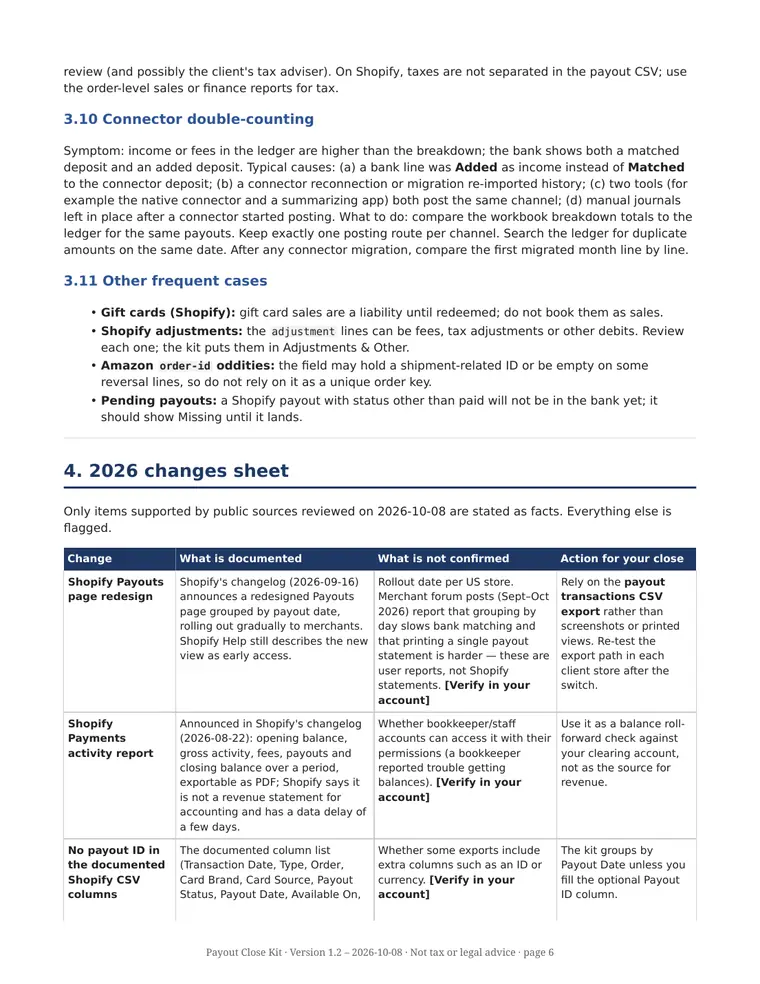
Shopify's changelog (September 2026) announced a redesigned Payouts page grouped by payout date, rolling out gradually. Some merchants have reported in Shopify's community forum that the new view makes bank matching and printing a single payout statement harder. These are user reports, not Shopify statements.Changes to QuickBooks e-commerce connectors
Intuit's help documentation (updated August 2026) describes rebuilt QuickBooks Online connectors for Shopify, Amazon and other channels that import transactions individually instead of one summary per payout. Some public app reviews mention unexpected changes such as chart-of-accounts changes. Exact timing varies by client file.
What's inside
Five files, one ZIP
Version 1.2. Every screenshot below is a real capture of the kit; all transaction figures shown are its built-in fictional sample data.
| File | What it is |
|---|---|
PayoutCloseKit.xlsx | Reconciliation workbook (Excel format; also opens in Google Sheets, no macros). Shopify tabs and Amazon tabs, editable category maps, suggested QBO/Xero account map. |
PayoutCloseKit_Guide.pdf | 9-page guide: monthly close procedure (clearing-account method), variance troubleshooting, 2026 changes sheet, client onboarding checklist, workbook reference and known limits. |
suggested_account_mapping.csv | The suggested account mapping as a standalone CSV. |
README.md + README.pdf | The same README in two formats (Markdown and PDF): quick start, notices, trademarks and license. |
Workbook tabs
- Start Here: instructions, sample-data warning, error counter
- SH Paste Export Here / AMZ Paste Export Here: paste the raw export rows; UNMAPPED and non-numeric counters
- SH Type Map / AMZ Category Map: editable tables that assign each line to a category
- SH Payout Breakdown / AMZ Settlement Breakdown: one row per payout or settlement, with a Check against the platform's own net
- SH Bank Match / AMZ Bank Match: Matched / Variance / Missing status with your tolerance
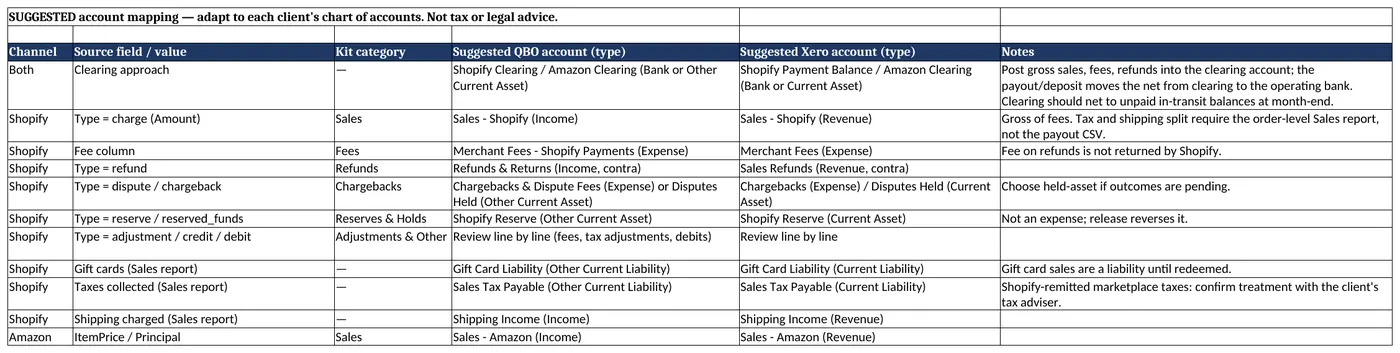
- Account Map (QBO-Xero): suggested accounts to adapt to each client's chart of accounts

Break down, then match the bank
Shopify payouts are split into sales, fees, refunds, chargebacks, reserves & holds, and adjustments & other. Amazon settlements add tax and advertising categories. In the Bank Match tabs you enter the bank deposit date and amount; each row shows Matched, Variance or Missing. Negative payouts (bank debits) are supported.


Suggested QuickBooks Online / Xero account map
A clearing-account approach per channel, with suggested QBO and Xero accounts for sales, fees, refunds, chargebacks, reserves, marketplace facilitator tax, advertising and reimbursements. These are suggestions to adapt to each client's chart of accounts, not prescribed treatments.
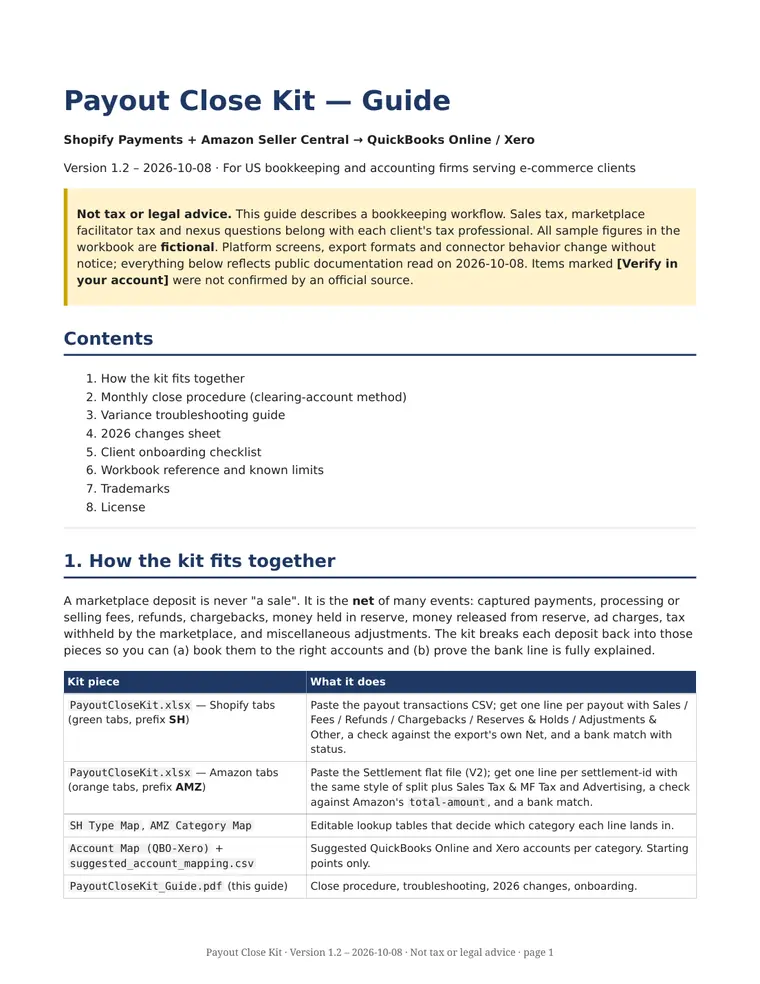
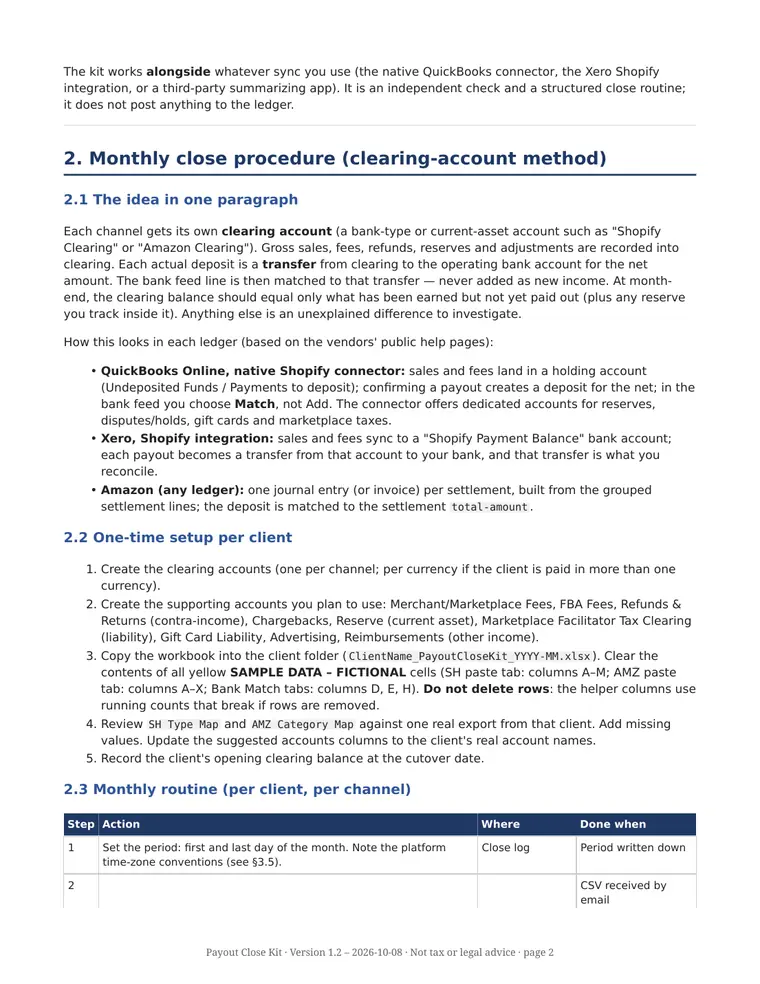
The PDF guide (9 pages)
Sections: 1. How the kit fits together · 2. Monthly close procedure (clearing-account method), with one-time setup per client, monthly routine and a close log template · 3. Variance troubleshooting (reserves and holds, refunds after payout, chargebacks and disputes, currency, timing and cutoff, split deposits, negative payouts, Amazon deferred transactions, marketplace facilitator tax, connector double-counting, other frequent cases) · 4. 2026 changes sheet · 5. Client onboarding checklist · 6. Workbook reference and known limits · 7. Trademarks · 8. License.
Who it's for
Built for firms, not individual sellers
US bookkeeping firms
Firms that close the books every month for clients selling through Shopify Payments and/or Amazon Seller Central.
E-commerce accountants
Accountants who want a written, repeatable payout reconciliation procedure their team can follow and review.
QBO and Xero users
Firms whose clients keep their books in QuickBooks Online or Xero, with or without a connector already in place.
It's a good fit if you are comfortable with spreadsheets and clearing accounts and want a structured starting point you can adapt to your own firm's procedures.
What it is not
Please read before buying
- Not software or a connector. It is a spreadsheet workbook and a PDF guide. Nothing syncs automatically; you paste exports in yourself.
- No support, coaching or onboarding. It's a one-time self-serve download with no sessions, email support or setup help.
- No promised updates. Platform export formats change; you get version 1.2 as delivered.
- Not tax or legal advice. Sales tax, marketplace facilitator tax, nexus and any legal question belong with each client's qualified professional.
- No promise of results or time saved. Outcomes depend on your clients' data and your firm's process.
- Not every channel. Covers Shopify Payments and Amazon Seller Central only. Other payment methods (e.g. PayPal) and other marketplaces need their own reconciliation.
Compatibility
What you need
| Spreadsheet | Built in Excel format; also opens in Google Sheets (File → Import the .xlsx). No macros; standard functions only (e.g. SUMIFS, COUNTIFS, INDEX/MATCH). |
| Ledger | QuickBooks Online or Xero (suggested account map for both). |
| Shopify input | Shopify Payments payout transactions CSV export. |
| Amazon input | Amazon Seller Central Settlement report flat file (V2). The Date Range Report is not pre-wired. |
| Capacity per workbook copy | Up to 3,000 Shopify lines, 5,000 Amazon lines and 200 payouts / settlements. Make one copy per client and period. |
| Language | US English. |
Column names follow public Shopify Help and Amazon documentation read on October 8, 2026. Items marked "Verify in your account" in the guide were not confirmed by an official source.
FAQ
Frequently asked questions
What exactly do I receive after purchase?
A ZIP download containing five files, all version 1.2: PayoutCloseKit.xlsx, PayoutCloseKit_Guide.pdf (9 pages), suggested_account_mapping.csv, README.md and README.pdf (the same README in two formats).
Can I use it for all of my firm's clients?
Yes. The single-firm license lets the purchasing firm use the kit internally and for its own clients. Resale, redistribution, sharing or publishing the kit or its files (original or modified) is not allowed.
Does it replace A2X, Link My Books, Synder or the QuickBooks connector?
No. It is not software and does not post anything to your ledger. It can be used alongside a connector to check payouts and investigate variances, or on its own if you book entries manually.
Does it work with Google Sheets?
Built in Excel format; also opens in Google Sheets (import the .xlsx). The workbook uses no macros and only standard functions.
Is there support or are updates included?
No. The price covers the files as delivered. There is no support, onboarding, coaching or promised updates.
Is the sample data real?
No. All pre-filled transactions, IDs, order numbers and bank amounts are fictional, for demonstration only. You clear them before use.
Does it cover TikTok Shop, eBay, Etsy or PayPal?
No. Version 1.2 covers Shopify Payments and Amazon Seller Central only.
Who processes my payment?
Paddle.com, our online reseller and Merchant of Record, handles the order, payment and invoice. Refunds follow our Refund Policy.
Get the Payout Close Kit
Workbook, 9-page guide, account mapping CSV and README. One-time payment, single-firm license, instant digital download.
Our order process is conducted by our online reseller Paddle.com. Paddle.com is the Merchant of Record for all our orders.
By purchasing, you agree to our Terms and Refund Policy.
Trademark notice. Shopify, Amazon, Amazon Seller Central, QuickBooks, Intuit, Xero, Microsoft Excel, Google Sheets, A2X, Link My Books, Synder, TikTok Shop, eBay, Etsy and PayPal are trademarks of their respective owners. OfferzGo and the Payout Close Kit are not affiliated with, sponsored by or endorsed by any of them. Names are used only to describe compatibility with their exports and software.